

Latest Version
RustDesk
Tools
Linux
Free
com.rustdesk.RustDesk
Report a Problem
More About RustDesk
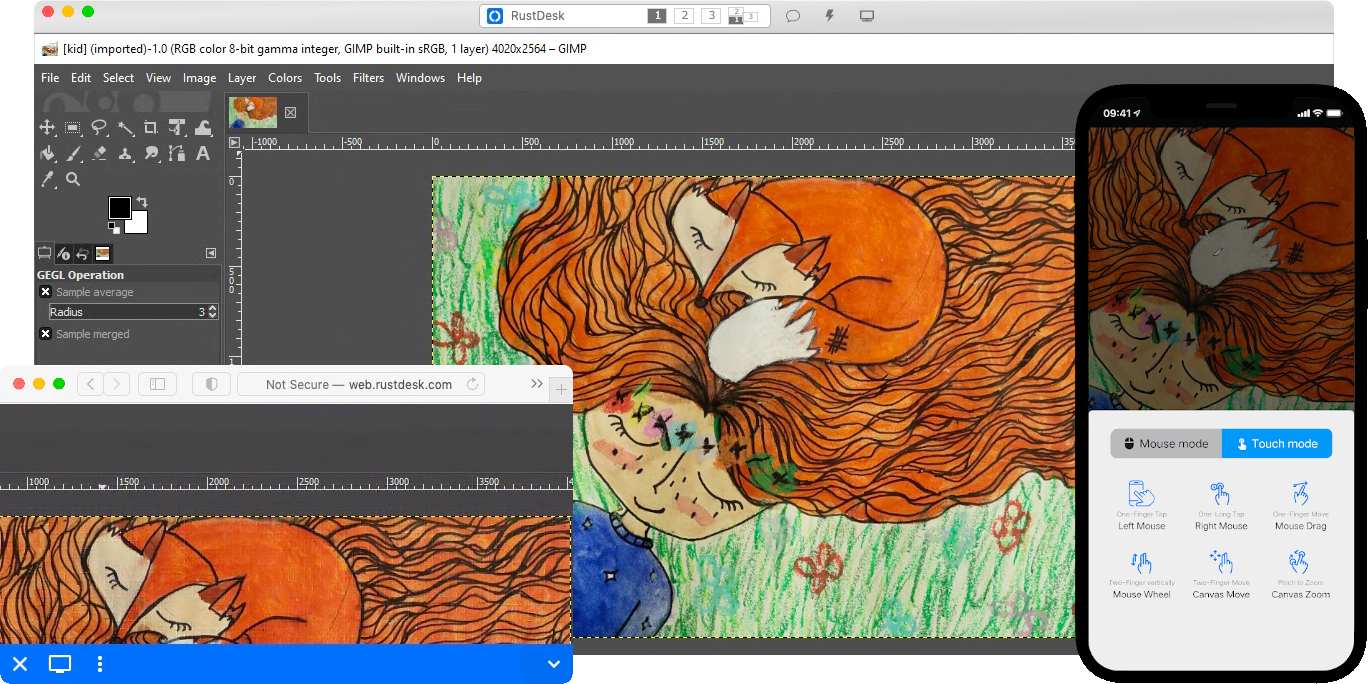
While most remote control utilities tie you to proprietary cloud servers, the RustDesk secure remote desktop access tool flips the script by putting data ownership entirely in your hands. Built on a foundation of open-source transparency and modern security protocols, this lightweight application is designed for users who refuse to compromise on privacy or performance.
Why RustDesk Secure Remote Desktop Access Stands Out
The defining characteristic of RustDesk is its self-hosting capability. Instead of routing your sensitive desktop streams through third-party servers, you can easily deploy your own signaling and relay servers on your local or cloud-based infrastructure. This makes it an invaluable asset for corporate IT departments, privacy advocates, and home-lab enthusiasts alike.
Advanced Video Compression and Encoding
To deliver a lag-free experience across varying network conditions, the platform supports a wide array of modern video codecs. Depending on your system configuration, you can leverage software-based compression or hardware-accelerated encoding, including:
- Software Codecs: Efficient VP8, VP9, and AV1 video processing.
- Hardware Acceleration: High-performance H264 and H265 codecs for reduced CPU overhead and smoother frame rates.
Zero-Hassle Portability and Security
Establishing a remote session is remarkably straightforward. Security is maintained from the ground up using end-to-end encryption based on the highly trusted NaCl cryptography library. This ensures that even in peer-to-peer (P2P) connections, your data stream remains private and inaccessible to unauthorized parties.
Furthermore, Windows users can run the client instantly without local installation or administrative privileges. When administrative tasks need to be executed on the target machine, users can elevate privileges locally or request elevation remotely on demand, striking a perfect balance between usability and system security.
An Adaptable Companion for Linux Users
As a native tool categorized under system utility tools, this application integrates seamlessly into modern Linux desktop environments. Whether you are managing headless servers or providing remote support to non-technical users, its clean interface and minimal configuration requirements mean you spend less time troubleshooting connections and more time getting work done.
Key Features at a Glance
- True Data Ownership: Full control over your self-hosted relay servers.
- Cross-Platform Harmony: Compatible across desktop and mobile ecosystems.
- Robust Security: End-to-end NaCl-encrypted peer-to-peer tunnels.
- Lightweight Footprint: Minimal setup needed with zero administrative bloat.
Is It Right For You?
If you are tired of licensing fees, restrictive usage policies, and the privacy concerns of commercial remote desktop software, this tool offers a refreshing, high-performance alternative. It is built specifically for those who value simplicity, speed, and complete control over their digital environment.
To experience this powerful utility firsthand, we encourage you to check out the official deployment and installation options on the official Flathub app page.
Rate the App
User Reviews










Popular Apps









Editor's Choice